
Introduction
Theme Settings is a professional WordPress theme options framework that provides 30+ field types, unlimited repeater fields, and a beautiful admin UI. Build powerful theme options in minutes.
Free vs Pro
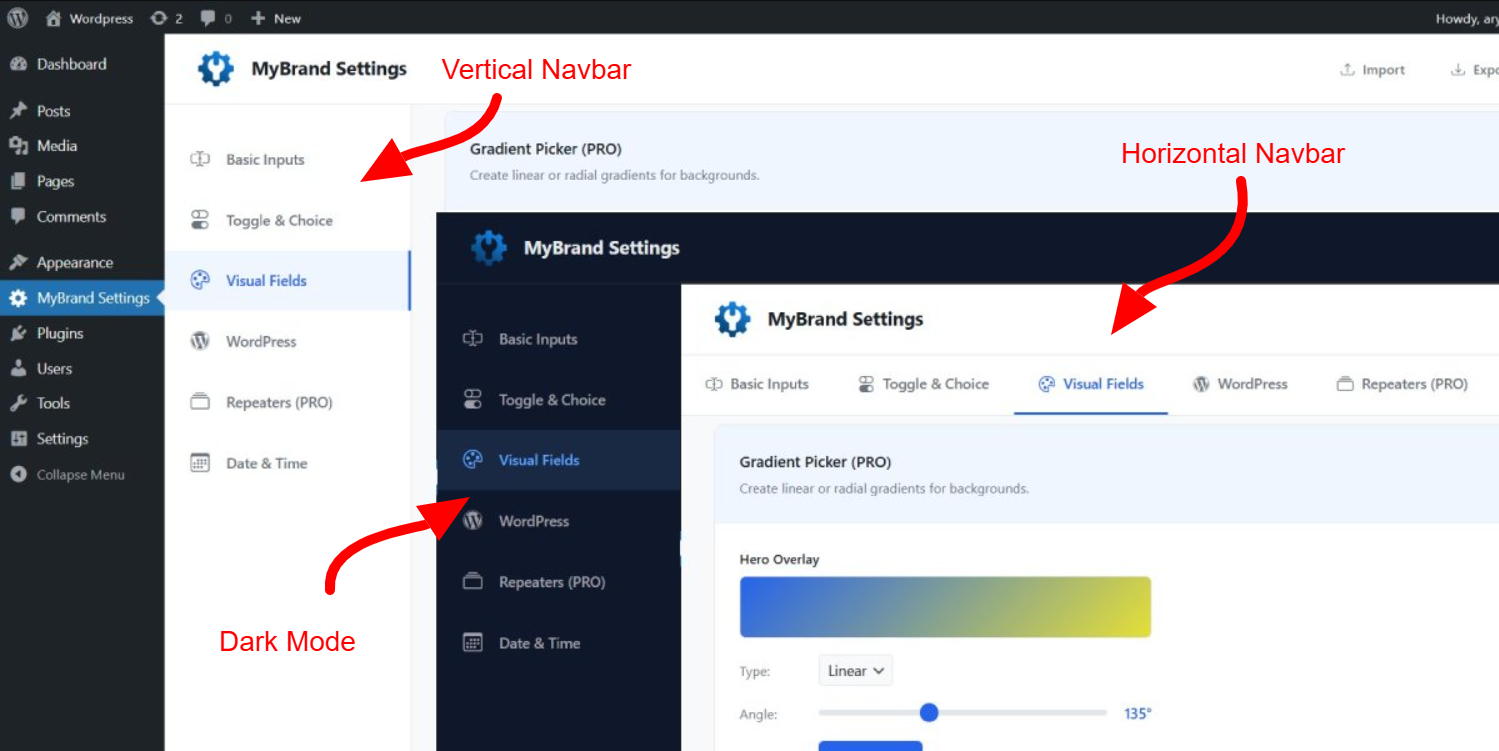
The free version includes basic fields, Visual fields and WordPress relations. Repeater fields, gradient color, Select layout and Upload files are only available in the Pro version.
Features
30+ Field Types
Text, select, color, media, typography, and more
Repeater Fields
12 built-in templates for dynamic content
Beautiful UI
Professional admin interface with tabs & sections
WordPress Native
Uses 100% WordPress APIs, no conflicts
Installation
Installing Theme Settings is straightforward. Follow these steps to get up and running in minutes.
Step 1: Download
Download the Theme Settings package from GitHub (free) or your account dashboard (Pro).
Step 2: Copy to Theme
Extract the package and copy the themesettings folder to your WordPress theme directory:
wp-content/themes/your-theme/themesettings/Step 3: Include in functions.php
Add the following line to your theme's functions.php file:
// Include Theme Settings
require_once get_template_directory() . '/themesettings/theme-settings.php';
That's it!
Open your wp-admin and Navigate to Theme Settings in your WordPress admin menu to configure your options.
Configuration
All settings are configured in the settings-config.php file. This file defines your tabs, sections, and fields.
Basic Structure
Settings are organized into Tabs → Sections → Fields:
return [
    // Tab
    'general' => [
        'title' => __('General', 'themename'),
        'icon'  => 'bi-gear',
        'sections' => [
            // Section
            'site_identity' => [
                'title' => __('Site Identity', 'themename'),
                'desc'  => __('Configure branding.', 'themename'),
                'fields' => [
                    // Field
                    'site_logo' => [
                        'type'  => 'media',
                        'label' => __('Site Logo', 'themename'),
                        'desc'  => __('Upload logo.', 'themename'),
                    ],
                ],
            ],
        ],
    ],
];
Field Parameters
Each field supports the following parameters:
| Parameter | Type | Description |
|---|---|---|
type |
string | Field type (text, select, color, etc.) |
label |
string | Field label displayed in admin |
desc |
string | Help text below the field |
default |
mixed | Default value |
placeholder |
string | Placeholder text for inputs |
required |
bool | Mark field as required |
options |
array | Options for select, radio, checkbox |
Folder Structure
Understanding the folder structure will help you customize and extend Theme Settings.
themesettings/
├── theme-settings.php          # Main entry point (Edit This)
├── settings-config.php         # Your settings config (Edit This)
├── assets/
│   ├── css/
│   │   └── theme-settings.css  # Admin styles
│   ├── js/
│   │   └── theme-settings.js   # Admin scripts
│   └── images/                 # Layout preview images
├── includes/
│   ├── front-enqueue.php           # add bootstrap icons
│   ├── class-default-handler.php   # Renders all default value
│   ├── class-field-renderer.php    # Renders all field types
│   ├── class-field-sanitizer.php   # Sanitization & validation
│   ├── class-settings-api.php      # Get/Set options helper
│   ├── class-media-handler.php     # Media upload handler
│   └──  class-repeater-handler.php  # Repeater templates (pro)
├── fields/
│   ├── basic-fields.php        # Text, Textarea, Number
│   ├── toggle-fields.php       # Switch, Checkbox, Radio
│   ├── visual-fields.php       # Color, Gradient, Typography
│   ├── wordpress-fields.php    # Page, Post, Menu Select
│   └── repeater-fields.php     # Repeater helpers (pro)
└── views/
    └── settings-page.php       # Admin page template
Important
Modify the settings-config.php file to configure your Theme fields/options. Modify the theme-settings.php file to change the brand name, URL, theme, and logo to match your brand. No other files need to be edited to ensure a smooth update.
Text & Textarea
Basic text input fields for single-line and multi-line content.
Text Field
'hero_title' => [
    'type'        => 'text',
    'label'       => __('Hero Title', 'themename'),
    'placeholder' => __('Welcome to our website', 'themename'),
    'default'     => 'Welcome to our website',
],
Textarea Field
'hero_description' => [
    'type'        => 'textarea',
    'label'       => __('Hero Description', 'themename'),
    'placeholder' => __('Enter description...', 'themename'),
    'rows'        => 4,
    'default'     => 'Description about your website',
],
Usage in Theme
<h1><?php echo esc_html(ts_get_option('hero_title')); ?></h1>
<p><?php echo esc_html(ts_get_option('hero_description')); ?></p>
Number
Numeric input field with optional min, max, and step constraints.
Configuration
'posts_per_page' => [
    'type'    => 'number',
    'label'   => __('Posts Per Page', 'themename'),
    'desc'    => __('Number of posts to display on archive pages.', 'themename'),
    'min'     => 1,
    'max'     => 50,
    'step'    => 1,
    'default' => 10,
],
Parameters
| Parameter | Type | Description |
|---|---|---|
min | int | Minimum allowed value |
max | int | Maximum allowed value |
step | int/float | Increment step (default: 1) |
Usage
// Get posts per page
$posts_per_page = ts_get_option('posts_per_page', 10);

// Use in WP_Query
$query = new WP_Query([
    'posts_per_page' => intval($posts_per_page),
]);

// Output as CSS variable
$width = ts_get_option('content_width', 1200);
echo "<style>:root { --content-width: {$width}px; }</style>";
URL, Email & Tel
Specialized input fields with built-in validation for URLs, email addresses, and phone numbers.
URL Field
'website_url' => [
    'type'        => 'url',
    'label'       => __('Website URL', 'themename'),
    'placeholder' => 'https://example.com',
    'default'     => 'https://example.com',
],
Email Field
'contact_email' => [
    'type'        => 'email',
    'label'       => __('Contact Email', 'themename'),
    'placeholder' => 'info@example.com',
    'desc'        => __('Primary contact email address.', 'themename'),
    'default'     => 'info@example.com',
],
Phone Field
'contact_phone' => [
    'type'        => 'tel',
    'label'       => __('Phone Number', 'themename'),
    'placeholder' => '+1 (555) 123-4567',
    'default'     => '',
],
Usage
// URL - with esc_url for security
<a href="<?php echo esc_url(ts_get_option('website_url')); ?>">Visit Website</a>

// Email - with mailto link
<?php if ($email = ts_get_option('contact_email')) : ?>
    <a href="mailto:<?php echo esc_attr($email); ?>">
        <?php echo esc_html($email); ?>
    </a>
<?php endif; ?>

// Phone - with tel link (strip non-numeric for href)
<?php if ($phone = ts_get_option('contact_phone')) : ?>
    <a href="tel:<?php echo preg_replace('/[^0-9+]/', '', $phone); ?>">
        <?php echo esc_html($phone); ?>
    </a>
<?php endif; ?>
WYSIWYG Editor
Rich text editor powered by WordPress TinyMCE. Perfect for formatted content like about sections, terms, or custom HTML.
Configuration
'about_content' => [
    'type'          => 'wysiwyg',
    'label'         => __('About Content', 'themename'),
    'desc'          => __('Rich text content for about section.', 'themename'),
    'media_buttons' => true,   // Show Add Media button
    'teeny'         => false,  // Full toolbar (true = minimal)
    'rows'          => 10,     // Editor height
    'default'     => '<p>Welcome to our awesome website</p>',
],

// Minimal editor without media
'footer_text' => [
    'type'          => 'wysiwyg',
    'label'         => __('Footer Text', 'themename'),
    'media_buttons' => false,
    'teeny'         => true,
    'rows'          => 5,
    'default'     => 'Welcome to our awesome website',
],
Parameters
| Parameter | Type | Default | Description |
|---|---|---|---|
media_buttons | bool | true | Show/hide Add Media button |
teeny | bool | false | Use minimal toolbar |
rows | int | 10 | Editor height in rows |
Usage
// Output with wp_kses_post (allows safe HTML)
<div class="about-content">
    <?php echo wp_kses_post(ts_get_option('about_content')); ?>
</div>

// Apply WordPress content filters (shortcodes, embeds, etc.)
<div class="rich-content">
    <?php echo apply_filters('the_content', ts_get_option('about_content')); ?>
</div>
Switch & Checkbox
Boolean toggle fields for on/off settings. Switch provides a modern toggle UI, while checkbox offers traditional checkboxes including multi-select groups.
Switch (Toggle)
'sticky_header' => [
    'type'         => 'switch',
    'label'        => __('Sticky Header', 'themename'),
    'switch_label' => __('Enable sticky header on scroll', 'themename'),
    'default'      => true,
],
Single Checkbox
'show_author' => [
    'type'    => 'checkbox',
    'label'   => __('Post Meta', 'themename'),
    'text'    => __('Show author name on posts', 'themename'),
    'default' => true,
],
Checkbox Group (Multi-select)
'share_buttons' => [
    'type'    => 'checkbox_group',
    'label'   => __('Share Buttons', 'themename'),
    'desc'    => __('Select social platforms to display.', 'themename'),
    'options' => [
        'facebook'  => __('Facebook', 'themename'),
        'twitter'   => __('Twitter / X', 'themename'),
        'linkedin'  => __('LinkedIn', 'themename'),
        'pinterest' => __('Pinterest', 'themename'),
        'whatsapp'  => __('WhatsApp', 'themename'),
    ],
    'default' => ['facebook', 'twitter'],
],
Usage
// Switch/Checkbox - returns boolean
if (ts_get_option('sticky_header', false)) {
    echo '<header class="is-sticky">';
}

// Checkbox Group - returns array
$share_buttons = ts_get_option('share_buttons', []);

if (in_array('facebook', $share_buttons)) {
    echo '<a href="...">Share on Facebook</a>';
}

// Loop through selected options
foreach ($share_buttons as $platform) {
    echo "<span class='share-{$platform}'></span>";
}
Select & Radio
Choice fields for selecting from predefined options.
Select Dropdown
'header_style' => [
    'type'    => 'select',
    'label'   => __('Header Style', 'themename'),
    'options' => [
        'style1' => __('Classic', 'themename'),
        'style2' => __('Centered', 'themename'),
        'style3' => __('Minimal', 'themename'),
    ],
    'default' => 'style1',
],
Radio Buttons
'sidebar_position' => [
    'type'    => 'radio',
    'label'   => __('Sidebar Position', 'themename'),
    'options' => [
        'left'  => __('Left', 'themename'),
        'right' => __('Right', 'themename'),
        'none'  => __('No Sidebar', 'themename'),
    ],
    'default' => 'right',
],
Color Picker
Color selection field with visual picker. Supports HEX, RGB, and RGBA formats with alpha transparency.
Basic Color
'primary_color' => [
    'type'    => 'color',
    'label'   => __('Primary Color', 'themename'),
    'desc'    => __('Main brand color for buttons and links.', 'themename'),
    'default' => '#2563eb',
],

'text_color' => [
    'type'    => 'color',
    'label'   => __('Text Color', 'themename'),
    'default' => '#1f2937',
],
Color with Alpha (RGBA)
'overlay_color' => [
    'type'    => 'color',
    'label'   => __('Overlay Color', 'themename'),
    'alpha'   => true,  // Enable transparency
    'default' => 'rgba(0, 0, 0, 0.5)',
],
Usage
// Output as CSS variables
function mytheme_custom_colors() {
    $primary = ts_get_option('primary_color', '#2563eb');
    $text    = ts_get_option('text_color', '#1f2937');
    $overlay = ts_get_option('overlay_color', 'rgba(0,0,0,0.5)');
    ?>
    <style>
    :root {
        --color-primary: <?php echo esc_attr($primary); ?>;
        --color-text: <?php echo esc_attr($text); ?>;
        --color-overlay: <?php echo esc_attr($overlay); ?>;
    }
    </style>
    <?php
}
add_action('wp_head', 'mytheme_custom_colors');
Media Upload
File upload field using WordPress Media Library. Supports images, videos, PDFs, and other file types with preview.
Image Upload
'site_logo' => [
    'type'          => 'media',
    'label'         => __('Site Logo', 'themename'),
    'desc'          => __('Recommended size: 200x60px', 'themename'),
    'allowed_types' => ['image'],  // image, video, audio, application
    'preview'       => true,
    'default' => [
        'id'  => 0,
        'url' => get_template_directory_uri() . '/images/logo.png',
    ],
],
Usage
// Media returns: ['id' => 123, 'url' => '...']
$logo = ts_get_option('site_logo');

if (!empty($logo['url'])) {
    echo '<img src="' . esc_url($logo['url']) . '" alt="Logo">';
}

// Get different image size using attachment ID
if (!empty($logo['id'])) {
    echo wp_get_attachment_image($logo['id'], 'medium');
}
Typography
Font selection field with Google Fonts integration. Choose from 1000+ fonts with live preview.
Configuration
'body_font' => [
    'type'    => 'typography',
    'label'   => __('Body Font', 'themename'),
    'desc'    => __('Font for paragraphs and general text.', 'themename'),
    'default' => 'Open Sans',
],

'heading_font' => [
    'type'    => 'typography',
    'label'   => __('Heading Font', 'themename'),
    'desc'    => __('Font for H1-H6 headings.', 'themename'),
    'default' => 'Montserrat',
],
Usage
// Enqueue Google Fonts
function mytheme_enqueue_fonts() {
    $body_font    = ts_get_option('body_font', 'Open Sans');
    $heading_font = ts_get_option('heading_font', 'Montserrat');

    $fonts = [];
    if ($body_font) {
        $fonts[] = str_replace(' ', '+', $body_font) . ':wght@400;500;600';
    }
    if ($heading_font && $heading_font !== $body_font) {
        $fonts[] = str_replace(' ', '+', $heading_font) . ':wght@500;600;700';
    }

    if (!empty($fonts)) {
        $url = 'https://fonts.googleapis.com/css2?family=' . implode('&family=', $fonts) . '&display=swap';
        wp_enqueue_style('theme-google-fonts', $url, [], null);
    }
}
add_action('wp_enqueue_scripts', 'mytheme_enqueue_fonts');

// Output CSS
function mytheme_typography_css() {
    $body    = ts_get_option('body_font', 'Open Sans');
    $heading = ts_get_option('heading_font', 'Montserrat');
    ?>
    <style>
    body { font-family: '<?php echo esc_attr($body); ?>', sans-serif; }
    h1, h2, h3, h4, h5, h6 { font-family: '<?php echo esc_attr($heading); ?>', sans-serif; }
    </style>
    <?php
}
add_action('wp_head', 'mytheme_typography_css');
Range Slider
Visual slider input for numeric values. Displays current value and allows precise control with min/max limits.
Configuration
'base_font_size' => [
    'type'    => 'range',
    'label'   => __('Base Font Size', 'themename'),
    'min'     => 14,
    'max'     => 20,
    'step'    => 1,
    'unit'    => 'px',
    'default' => 16,
],

'section_padding' => [
    'type'    => 'range',
    'label'   => __('Section Padding', 'themename'),
    'min'     => 40,
    'max'     => 120,
    'step'    => 10,
    'unit'    => 'px',
    'default' => 80,
],

'content_opacity' => [
    'type'    => 'range',
    'label'   => __('Overlay Opacity', 'themename'),
    'min'     => 0,
    'max'     => 100,
    'step'    => 5,
    'unit'    => '%',
    'default' => 50,
],
Parameters
| Parameter | Type | Description |
|---|---|---|
min | int | Minimum value |
max | int | Maximum value |
step | int/float | Increment step |
unit | string | Display unit (px, %, em, etc.) |
Usage
function mytheme_layout_css() {
    $font_size = ts_get_option('base_font_size', 16);
    $padding   = ts_get_option('section_padding', 80);
    $opacity   = ts_get_option('content_opacity', 50) / 100;
    ?>
    <style>
    :root {
        --font-size-base: <?php echo intval($font_size); ?>px;
        --section-padding: <?php echo intval($padding); ?>px;
        --overlay-opacity: <?php echo floatval($opacity); ?>;
    }
    body { font-size: var(--font-size-base); }
    section { padding: var(--section-padding) 0; }
    .overlay { background: rgba(0, 0, 0, var(--overlay-opacity)); }
    </style>
    <?php
}
add_action('wp_head', 'mytheme_layout_css');
WordPress Relations
Fields for selecting WordPress content: pages, posts, categories, tags, and menus.
Page Select
'about_page' => [
    'type'  => 'page_select',
    'label' => __('About Page', 'themename'),
    'desc'  => __('Select page to display in about section.', 'themename'),
    'default' => '',
],
Post Select
'featured_post' => [
    'type'      => 'post_select',
    'label'     => __('Featured Post', 'themename'),
    'post_type' => 'post',
    'default' => '',
],
Category Select
'featured_category' => [
    'type'     => 'category_select',
    'label'    => __('Featured Category', 'themename'),
    'taxonomy' => 'category',
    'default' => '',
],
Menu Select
'footer_menu' => [
    'type'  => 'menu_select',
    'label' => __('Footer Menu', 'themename'),
    'desc'  => __('Select navigation menu for footer.', 'themename'),
    'default' => '',
],
Usage
// Page Select - returns page ID
$about_id = ts_get_option('about_page');
if ($about_id) {
    $about = get_post($about_id);
    echo '<h2>' . esc_html($about->post_title) . '</h2>';
    echo apply_filters('the_content', $about->post_content);
}

// Category Select - returns term ID
$cat_id = ts_get_option('featured_category');
if ($cat_id) {
    $posts = get_posts([
        'category' => $cat_id,
        'numberposts' => 6,
    ]);
}

// Menu Select - returns menu ID
$menu_id = ts_get_option('footer_menu');
if ($menu_id) {
    wp_nav_menu([
        'menu' => $menu_id,
        'container' => 'nav',
    ]);
}
Color PalettePRO
Predefined color selector with visual swatches. Users choose from a curated palette instead of full color picker.
Configuration
'accent_color' => [
    'type'   => 'color_palette',
    'label'  => __('Accent Color', 'themename'),
    'desc'   => __('Choose from predefined brand colors.', 'themename'),
    'colors' => [
        '#1e40af' => __('Blue', 'themename'),
        '#059669' => __('Green', 'themename'),
        '#dc2626' => __('Red', 'themename'),
        '#f59e0b' => __('Orange', 'themename'),
        '#7c3aed' => __('Purple', 'themename'),
    ],
    'default' => '#1e40af',
],
Parameters
| Parameter | Type | Description |
|---|---|---|
colors | array | Array of hex colors with labels (hex => label) |
default | string | Default hex color value |
Usage
function mytheme_accent_color_css() {
    $accent = ts_get_option('accent_color', '#1e40af');
    ?>
    <style>
    :root {
        --color-accent: <?php echo esc_attr($accent); ?>;
    }
    .btn-primary { background-color: var(--color-accent); }
    a:hover { color: var(--color-accent); }
    .highlight { border-left: 4px solid var(--color-accent); }
    </style>
    <?php
}
add_action('wp_head', 'mytheme_accent_color_css');
UNLOCK PRO
List SorterPRO
Drag-and-drop sortable list. Users reorder items visually, perfect for widget areas, menu items, or feature priorities.
Configuration
// homepage section sorter
'home_sections' => [
    'type'  => 'list_sorter',
    'label' => __('Homepage Section Order', 'themename'),
    'items' => [
        'hero'     => __('Hero Section', 'themename'),
        'features' => __('Features', 'themename'),
        'services' => __('Services', 'themename'),
        'portfolio' => __('Portfolio', 'themename'),
        'contact'  => __('Contact Form', 'themename'),
    ],
    'default' => ['hero', 'features', 'services', 'portfolio', 'contact'],
],
Parameters
| Parameter | Type | Description |
|---|---|---|
items | array | Array of items (key => label) |
Usage
// Get list
$section_order = get_theme_mod('home_sections', ['hero', 'features', 'services', 'portfolio', 'contact']);

// Display section order
foreach ($section_order as $section) {
    switch ($section) {
        case 'hero':
            get_template_part('template-parts/sections/hero');
            break;

        case 'features':
            get_template_part('template-parts/sections/features');
            break;

        case 'services':
            get_template_part('template-parts/sections/services');
            break;

        case 'portfolio':
            get_template_part('template-parts/sections/portfolio');
            break;

        case 'contact':
            get_template_part('template-parts/sections/contact');
            break;
    }
}
UNLOCK PRO
Gradient ColorPRO
Visual gradient builder with color stops and angle control. Create linear or radial gradients with live preview.
Configuration
'hero_gradient' => [
    'type'  => 'gradient',
    'label' => __('Hero Background Gradient', 'themename'),
    'desc'  => __('Create custom gradient for hero section.', 'themename'),
],

'button_gradient' => [
    'type'  => 'gradient',
    'label' => __('Button Gradient', 'themename'),
    'desc'  => __('Gradient background for primary buttons.', 'themename'),
],
Usage
function mytheme_gradient_css() {
    $hero_gradient   = ts_get_option('hero_gradient', 'linear-gradient(135deg, #667eea 0%, #764ba2 100%)');
    $button_gradient = ts_get_option('button_gradient', 'linear-gradient(to right, #f857a6, #ff5858)');
    ?>
    <style>
    .hero-section {
        background: <?php echo esc_attr($hero_gradient); ?>;
    }
    .btn-primary {
        background: <?php echo esc_attr($button_gradient); ?>;
    }
    .btn-primary:hover {
        opacity: 0.9;
    }
    </style>
    <?php
}
add_action('wp_head', 'mytheme_gradient_css');
UNLOCK PRO
💡 Tip: The gradient field returns a complete CSS gradient string (e.g., "linear-gradient(135deg, #667eea 0%, #764ba2 100%)"). You can use it directly in CSS without additional processing.
File UploadPRO
Upload any file type (PDF, DOCX, ZIP, etc.). Perfect for downloadable resources, documentation, or attachments.
Configuration
'product_brochure' => [
    'type'  => 'file',
    'label' => __('Product Brochure (PDF)', 'themename'),
    'allowed_types' => ['application/pdf'],
    'desc'  => __('Upload downloadable brochure for users.', 'themename'),
    'default' => '',
],

'hero_video' => [
    'type'          => 'file',
    'label'         => __('Hero Video', 'themename'),
    'allowed_types' => ['video'],
    'desc'          => __('MP4 format recommended.', 'themename'),
    'default'       => '',
],
Usage
// Get file URL
$brochure_url = ts_get_option('product_brochure');

if ($brochure_url) {
    // Get file info
    $file_id   = attachment_url_to_postid($brochure_url);
    $file_name = basename($brochure_url);
    $file_size = size_format(filesize(get_attached_file($file_id)));

    // Display download link
    echo '<a href="' . esc_url($brochure_url) . '" class="download-btn" download>';
    echo '<i class="bi bi-download"></i> ';
    echo 'Download Brochure (' . esc_html($file_size) . ')';
    echo '</a>';
}

// Video background
$video = ts_get_option('hero_video');
if (!empty($video['url'])) {
    echo '<video autoplay muted loop>';
    echo '<source src="' . esc_url($video['url']) . '" type="video/mp4">';
    echo '</video>';
}
UNLOCK PRO
⚠️ Note: The file field returns the file URL. Use attachment_url_to_postid() to get file metadata like size, type, or title.
Image SelectPRO
Visual layout selector with image previews. Users choose from predefined options by clicking images instead of text.
To easily create a preview layout image, please create it in the:
Preview Generator AppConfiguration
'header_layout' => [
    'type'    => 'image_select',
    'label'   => __('Header Layout', 'themename'),
    'desc'    => __('Choose header layout style.', 'themename'),
    'options' => [
        'layout-1' => THEME_SETTINGS_URL . 'assets/images/header-1.svg',
        'layout-2' => THEME_SETTINGS_URL . 'assets/images/header-2.svg',
        'layout-3' => THEME_SETTINGS_URL . 'assets/images/header-3.svg',
    ],
    'default' => 'layout-1',
],

'footer_layout' => [
    'type'    => 'image_select',
    'label'   => __('Footer Layout', 'themename'),
    'options' => [
        'footer-1' => THEME_SETTINGS_URL . 'assets/images/footer-1.svg',
        'footer-2' => THEME_SETTINGS_URL . 'assets/images/footer-2.svg',
        'footer-3' => THEME_SETTINGS_URL . 'assets/images/footer-3.svg',
    ],
    'default' => 'footer-1',
],

'blog_layout' => [
    'type'    => 'image_select',
    'label'   => __('Blog Layout', 'themename'),
    'options' => [
        'grid'     => get_template_directory_uri() . '/images/blog-grid.svg',
        'list'     => get_template_directory_uri() . '/images/blog-list.svg',
        'masonry'  => get_template_directory_uri() . '/images/blog-masonry.svg',
    ],
    'default' => 'grid',
],
Parameters
| Parameter | Type | Description |
|---|---|---|
options | array | Array of choices (value => image_url) |
default | string | Default selected value |
Usage
// Get selected layout
$header_layout = ts_get_option('header_layout', 'layout-1');

// Load different header template based on selection
get_template_part('template-parts/headers/header', $header_layout);

// Or use in conditional
$blog_layout = ts_get_option('blog_layout', 'grid');

if ($blog_layout === 'grid') {
    echo '<div class="blog-grid">';
    // Grid layout
} elseif ($blog_layout === 'list') {
    echo '<div class="blog-list">';
    // List layout
} elseif ($blog_layout === 'masonry') {
    echo '<div class="blog-masonry">';
    // Masonry layout
}

// Add body class based on selection
function mytheme_layout_body_class($classes) {
    $layout = ts_get_option('header_layout', 'layout-1');
    $classes[] = 'header-' . $layout;
    return $classes;
}
add_filter('body_class', 'mytheme_layout_body_class');
UNLOCK PRO
💡 Tip: Use SVG files for preview images (lightweight and scalable). Recommended size: 300x200px for optimal display.
Repeater Fields
PRORepeater fields allow users to add, remove, and reorder dynamic content items. Perfect for FAQs, team members, testimonials, sliders, and more.
Built-in Templates
Theme Settings Pro includes 12 pre-configured repeater templates for common use cases. You can also use them to create unlimited repeat custom fields, such as pricing, timelines, brand data, and more.
| Template | Fields | Use Case |
|---|---|---|
text_links |
text, url | Navigation links, footer links |
icon_links |
icon, text, url | Social links, feature links |
faqs |
question, answer | FAQ sections |
services |
title, desc, image, link | Services, products |
features |
icon, title, desc | Feature lists |
slider |
image, title, link | Simple sliders |
slider_advanced |
image, title, desc, btn_text, btn_link | Hero sliders |
gallery |
image, title, desc | Image galleries |
reviews |
image, name, job, rating, text | Testimonials |
team |
image, name, job, desc | Team members |
social_links |
icon, url | Social media links |
list_text |
title | Simple lists |
12 Repeater Templates PRO
Dynamic field groups that users can add, remove, and reorder. Create unlimited items with multiple sub-fields.
How to Get Pre-built Repeater Templates
class TS_Settings_Config {
    public static function get_fields() {
        $repeater_templates = TS_Repeater_Handler::get_templates(); // Add this code

        return [
        ------------------------ Call repeater templates in here
1.Social Links
Create dynamic social media links with platform selection and icon picker. Perfect for headers, footers, or contact sections with customizable social profiles.
'social_links' => [
    'type'         => 'repeater',
    'label'        => __('Social Links', 'nametheme'),
    'desc'         => __('Add your social media (icon and url).', 'nametheme'),
    'button_label' => __('Add Social Link', 'nametheme'),
    'item_title'   => __('Social Link', 'nametheme'),
    'fields'       => $repeater_templates['social_links']['fields'],
    'default'      => [
        [
            'icon' => 'bi-facebook',
            'url'  => 'https://facebook.com/yourpage',
        ],
        [
            'icon' => 'bi-twitter-x',
            'url'  => 'https://twitter.com/yourhandle',
        ],
    ],
],
Usage:
$social_links = ts_get_option('social_links', []);

if (!empty($social_links) && is_array($social_links)) {
    echo '<div class="social-links-grid">';
    foreach ($social_links as $index => $social) {
        $icon = isset($social['icon']) ? $social['icon'] : '';
        $url = isset($social['url']) ? esc_url($social['url']) : '#';

        echo '<a href="' . $url . '" class="social-link" target="_blank" rel="noopener">';
        echo '<i class="bi ' . esc_attr($icon) . '"></i>';
        echo '</a>';
    }
    echo '</div>';
}
UNLOCK PRO
2.Text Links
Simple text-based link list with title, URL, and target options. Ideal for quick links, footer menus, or resource lists without additional styling.
'text_links' => [
    'type'         => 'repeater',
    'label'        => __('Custom Links', 'nametheme'),
    'desc'         => __('Add text link (text and url).', 'nametheme'),
    'button_label' => __('Add Link', 'nametheme'),
    'max'          => 5,
    'fields'       => $repeater_templates['text_links']['fields'],
    'default'      => [
        [
            'text' => 'About Us',
            'url'  => 'https://yoursite.com/about',
        ],
        [
            'text' => 'Contact',
            'url'  => 'https://yoursite.com/contact',
        ],
    ],
],
Usage:
$text_links = ts_get_option('text_links', []);

if (!empty($text_links)) {
    echo '<nav class="text-nav">';
    echo '<ul>';
    foreach ($text_links as $link) {
        $text = isset($link['text']) ? esc_html($link['text']) : '';
        $url = isset($link['url']) ? esc_url($link['url']) : '#';

        echo '<li><a href="' . $url . '">' . $text . '</a></li>';
    }
    echo '</ul>';
    echo '</nav>';
}
UNLOCK PRO
3.Icon Links
Icon-enhanced links with descriptions for visual navigation. Great for service shortcuts, feature highlights, or categorized link sections with Bootstrap Icons.
'icon_links' => [
    'type'         => 'repeater',
    'label'        => __('Useful Links', 'nametheme'),
    'desc'         => __('Add useful link (icon, text and url).', 'nametheme'),
    'button_label' => __('Add Link', 'nametheme'),
    'fields'       => $repeater_templates['icon_links']['fields'],
    'default'      => [
        [
            'icon' => 'bi-house-door',
            'text' => 'Home',
            'url'  => 'https://yoursite.com',
        ],
        [
            'icon' => 'bi-info-circle',
            'text' => 'About',
            'url'  => 'https://yoursite.com/about',
        ],
    ],
],
Usage:
$icon_links = ts_get_option('icon_links', []);

if (!empty($icon_links)) {
    echo '<div class="icon-links-container">';
    foreach ($icon_links as $item) {
        $icon = isset($item['icon']) ? $item['icon'] : '';
        $text = isset($item['text']) ? esc_html($item['text']) : '';
        $url = isset($item['url']) ? esc_url($item['url']) : '#';
        ?>
        <div class="icon-link-item">
            <a href="<?php echo $url; ?>">
                <i class="bi <?php echo esc_attr($icon); ?>"></i>
                <span><?php echo $text; ?></span>
            </a>
        </div>
        <?php
    }
    echo '</div>';
}
UNLOCK PRO
4.Features
Showcase product or service features with icons and descriptions. Perfect for homepage feature sections, product highlights, or benefits lists with visual icons.
'features' => [
    'type'         => 'repeater',
    'label'        => __('Features', 'nametheme'),
    'desc'         => __('Highlight your key features (icon, title and textarea).', 'nametheme'),
    'button_label' => __('Add Feature', 'nametheme'),
    'item_title'   => __('Feature', 'nametheme'),
    'fields'       => $repeater_templates['features']['fields'],
    'default'      => [
        [
            'icon'        => 'bi-speedometer2',
            'title'       => 'Custom Dashboards',
            'description' => 'Create personalized dashboards tailored to your needs. Visualize the metrics that matter most to your business with drag-and-drop widgets.',
        ],
        [
            'icon'        => 'bi-people',
            'title'       => 'Visitor Insights',
            'description' => 'Understand your audience better with detailed visitor demographics, behavior patterns, and engagement metrics to optimize your content strategy.',
        ],
    ],
],
Usage:
$features = ts_get_option('features', []);

if (!empty($features)) {
    echo '<div class="features-list">';
    foreach ($features as $feature) {
        $icon = isset($feature['icon']) ? $feature['icon'] : '';
        $title = isset($feature['title']) ? esc_html($feature['title']) : '';
        $description = isset($feature['description']) ? esc_html($feature['description']) : '';
        ?>
        <div class="feature-item">
            <div class="feature-icon">
                <i class="bi <?php echo esc_attr($icon); ?>"></i>
            </div>
            <div class="feature-text">
                <h4><?php echo $title; ?></h4>
                <p><?php echo $description; ?></p>
            </div>
        </div>
        <?php
    }
    echo '</div>';
}
UNLOCK PRO
5. Services
Complete service cards with images, descriptions, and links. Ideal for service pages, offerings sections, or business capabilities showcase with visual thumbnails.
'services' => [
    'type'         => 'repeater',
    'label'        => __('Services', 'nametheme'),
    'desc'         => __('List your services (image, title, textarea and url).', 'nametheme'),
    'button_label' => __('Add Service', 'nametheme'),
    'item_title'   => __('Service', 'nametheme'),
    'fields'       => $repeater_templates['services']['fields'],
    'default'      => [
        [
            'title'       => 'Web Design',
            'description' => 'Create stunning, modern websites that capture your brand\'s essence and engage your audience with beautiful, responsive designs tailored to your needs.',
            'image'       => [
                'id'  => 0,
                'url' => get_template_directory_uri() . '/src/img/gallery1.jpg',
            ],
            'link'        => 'https://yoursite.com/web-design',
        ],
        [
            'title'       => 'Web Development',
            'description' => 'Build powerful, scalable web applications using the latest technologies. From simple websites to complex web platforms, we deliver solutions that work.',
            'image'       => [
                'id'  => 0,
                'url' => get_template_directory_uri() . '/src/img/gallery2.jpg',
            ],
            'link'        => 'https://yoursite.com/web-development',
        ],
    ]
],
Usage:
$services = ts_get_option('services', []);

<?php if (is_array($services) && !empty($services)) : ?>
    <div class="grid-services">
        <?php foreach ($services as $service) :
            $title = trim($service['title'] ?? '');
            $desc  = trim($service['description'] ?? '');
            $link  = trim($service['link'] ?? '');
            $image = $service['image'] ?? '';
            $img   = is_array($image) ? ($image['url'] ?? '') : $image;
            if (!$title) continue;
        ?>
            <div class="service-card">
                <?php if ($img) : ?>
                    <div class="service-image">
                        <img
                            src="<?php echo esc_url($img); ?>"
                            alt="<?php echo esc_attr($title); ?>"
                            loading="lazy">
                    </div>
                <?php endif; ?>

                <div class="service-content">
                    <h3><?php echo esc_html($title); ?></h3>

                    <?php if ($desc) : ?>
                        <p><?php echo esc_html($desc); ?></p>
                    <?php endif; ?>

                    <?php if ($link) : ?>
                        <a href="<?php echo esc_url($link); ?>" class="link">
                            <?php esc_html_e('Learn More', 'nametheme'); ?>
                            <i class="bi bi-arrow-right"></i>
                        </a>
                    <?php endif; ?>
                </div>
            </div>
        <?php endforeach; ?>
    </div>
<?php endif; ?>
UNLOCK PRO
6.FAQs
Question and answer pairs for building accordion-style FAQ sections. Perfect for support pages, product documentation, or common customer inquiries.
'faqs' => [
    'type'         => 'repeater',
    'label'        => __('FAQs', 'nametheme'),
    'desc'         => __('Frequently asked questions (question and answer).', 'nametheme'),
    'button_label' => __('Add FAQ', 'nametheme'),
    'item_title'   => __('FAQ', 'nametheme'),
    'fields'       => $repeater_templates['faqs']['fields'],
    'default'      => [
        [
            'question' => 'How much does a website cost?',
            'answer'   => 'Website costs vary based on your requirements, features, and complexity. Basic websites start from $1,500, while custom e-commerce or complex applications can range from $5,000 to $20,000+. Contact us for a detailed quote tailored to your needs.',
        ],
        [
            'question' => 'Do you provide website maintenance?',
            'answer'   => 'Yes! We offer comprehensive maintenance packages including regular updates, security monitoring, backups, performance optimization, and content updates. Our plans start at $99/month and can be customized to your needs.',
        ],
    ],
],
Usage:
$faqs = ts_get_option('faqs', []);

if (!empty($faqs)) {
    echo '<div class="faq-accordion">';
    foreach ($faqs as $index => $faq) {
        $question = isset($faq['question']) ? esc_html($faq['question']) : '';
        $answer = isset($faq['answer']) ? wpautop($faq['answer']) : '';
        ?>
        <div class="faq-item" data-index="<?php echo $index; ?>">
            <div class="faq-question" onclick="toggleFAQ(<?php echo $index; ?>)">
                <h3><?php echo $question; ?></h3>
                <span class="faq-toggle">+</span>
            </div>
            <div class="faq-answer" id="faq-answer-<?php echo $index; ?>" style="display: none;">
                <?php echo $answer; ?>
            </div>
        </div>
        <?php
    }
    echo '</div>';
}
UNLOCK PRO
7.List Text
Simple bullet point list with optional icons for each item. Great for checklists, feature lists, package inclusions, or step-by-step instructions.
'list_items' => [
    'type'         => 'repeater',
    'label'        => __('List Items', 'nametheme'),
    'desc'         => __('List items (only text).', 'nametheme'),
    'button_label' => __('Add Item', 'nametheme'),
    'fields'       => $repeater_templates['list_text']['fields'],
    'default'      => [
        [
            'title' => 'Track unlimited websites and domains',
        ],
        [
            'title' => 'Real-time visitor monitoring and alerts',
        ],
    ],
],
Usage:
$text_list = ts_get_option('list_items', []);

if (!empty($text_list)) {
    echo '<ul class="styled-list">';
    foreach ($text_list as $item) {
        $title = isset($item['title']) ? esc_html($item['title']) : '';
        echo '<li>' . $title . '</li>';
    }
    echo '</ul>';
}
UNLOCK PRO
8.Slider
Basic image slider with title, subtitle, and call-to-action button. Perfect for hero sections, promotional banners, or simple image carousels with links.
'simple_slider' => [
    'type'         => 'repeater',
    'label'        => __('Image Slider', 'nametheme'),
    'desc'         => __('Create a slider (image, title, link).', 'nametheme'),
    'button_label' => __('Add Slide', 'nametheme'),
    'fields'       => $repeater_templates['slider']['fields'],
    'default'      => [
        [
            'image' => [
                'id'  => 0,
                'url' => get_template_directory_uri() . '/src/img/slider11.jpg',
            ],
            'title' => 'Powerful Analytics Dashboard',
            'link'  => 'https://yoursite.com/features/dashboard',
        ],
        [
            'image' => [
                'id'  => 0,
                'url' => get_template_directory_uri() . '/src/img/slider22.jpg',
            ],
            'title' => 'Real-Time Visitor Tracking',
            'link'  => 'https://yoursite.com/features/realtime',
        ],
    ],
],
Usage:
$slides = ts_get_option('simple_slider', []);

if (!empty($slides)) {
    echo '<div class="image-slider" id="mainSlider">';
    foreach ($slides as $index => $slide) {
        $image = isset($slide['image']) ? wp_get_attachment_image_url($slide['image'], 'full') : '';
        $title = isset($slide['title']) ? esc_html($slide['title']) : '';
        $link = isset($slide['link']) ? esc_url($slide['link']) : '';

        $active_class = ($index === 0) ? 'active' : '';
        ?>
        <div class="slide <?php echo $active_class; ?>">
            <?php if ($image): ?>
                <img src="<?php echo $image; ?>" alt="<?php echo $title; ?>">
            <?php endif; ?>
            <?php if ($title): ?>
                <div class="slide-caption">
                    <h3><?php echo $title; ?></h3>
                    <?php if ($link): ?>
                        <a href="<?php echo $link; ?>" class="slide-btn">View Details</a>
                    <?php endif; ?>
                </div>
            <?php endif; ?>
        </div>
        <?php
    }
    echo '</div>';

    // Slider navigation
    echo '<div class="slider-nav">';
    echo '<button onclick="prevSlide()" class="slider-prev">‹</button>';
    echo '<button onclick="nextSlide()" class="slider-next">›</button>';
    echo '</div>';
}
UNLOCK PRO
9.Slider Advanced
Full-featured slider with multiple buttons, overlay controls, and text alignment. Ideal for complex hero sections, product showcases, or marketing campaigns with detailed content.
'hero_slides' => [
    'type'         => 'repeater',
    'label'        => __('Hero Slides', 'nametheme'),
    'desc'         => __('Create a hero slider (image, title, description,button text, button link).', 'nametheme'),
    'button_label' => __('Add Slide', 'nametheme'),
    'item_title'   => __('Slide', 'nametheme'),
    'fields'       => $repeater_templates['slider_advanced']['fields'],
    'default'      => [
        [
            'image'       => [
                'id'  => 0,
                'url' => get_template_directory_uri() . '/src/img/slider1.jpg',
            ],
            'title'       => 'Build Your Dream Website Today',
            'description' => 'Transform your vision into reality with stunning, responsive websites that captivate your audience and drive results. Let\'s create something extraordinary together.',
            'button_text' => 'Get Started',
            'button_link' => 'https://yoursite.com/contact',
        ],
        [
            'image'       => [
                'id'  => 0,
                'url' => get_template_directory_uri() . '/src/img/slider2.jpg',
            ],
            'title'       => 'Professional Web Design That Converts',
            'description' => 'Stand out from the competition with custom web designs that blend creativity, functionality, and user experience. Your success is our priority.',
            'button_text' => 'View Portfolio',
            'button_link' => 'https://yoursite.com/portfolio',
        ],
    ],
],
Usage:
$hero_slides = ts_get_option('hero_slides', []);

if (!empty($hero_slides)) {
    echo '<div class="hero-slider">';
    foreach ($hero_slides as $index => $hero) {
        $image = isset($hero['image']) ? wp_get_attachment_image_url($hero['image'], 'full') : '';
        $title = isset($hero['title']) ? esc_html($hero['title']) : '';
        $description = isset($hero['description']) ? esc_html($hero['description']) : '';
        $button_text = isset($hero['button_text']) ? esc_html($hero['button_text']) : 'Learn More';
        $button_link = isset($hero['button_link']) ? esc_url($hero['button_link']) : '#';

        $active = ($index === 0) ? 'active' : '';
        ?>
        <div class="hero-slide <?php echo $active; ?>" style="background-image: url('<?php echo $image; ?>');">
            <div class="hero-content">
                <h2><?php echo $title; ?></h2>
                <p><?php echo $description; ?></p>
                <a href="<?php echo $button_link; ?>" class="hero-btn"><?php echo $button_text; ?></a>
            </div>
        </div>
        <?php
    }
    echo '</div>';
}
UNLOCK PRO
10.Gallery
Image gallery with captions, categories, and optional links. Perfect for portfolios, project showcases, photo galleries, or filterable image collections.
'gallery' => [
    'type'         => 'repeater',
    'label'        => __('Gallery', 'nametheme'),
    'desc'         => __('Create an image gallery (image, title, description).', 'nametheme'),
    'button_label' => __('Add Image', 'nametheme'),
    'item_title'   => __('Gallery Item', 'nametheme'),
    'fields'       => $repeater_templates['gallery']['fields'],
    'default'      => [
        [
            'image' => [
                'id'  => 0,
                'url' => get_template_directory_uri() . '/src/img/gallery-analytics-1.jpg',
            ],
            'title'       => 'Interactive Dashboard',
            'description' => 'Visualize your data with customizable widgets and real-time charts that update instantly.',
        ],
        [
            'image' => [
                'id'  => 0,
                'url' => get_template_directory_uri() . '/src/img/gallery-analytics-2.jpg',
            ],
            'title'       => 'Traffic Sources',
            'description' => 'Discover where your visitors come from with detailed referral and campaign tracking.',
        ],
    ],
],
Usage:
$gallery = ts_get_option('gallery', []);

if (!empty($gallery)) {
    echo '<div class="image-gallery">';
    foreach ($gallery as $item) {
        $image = isset($item['image']) ? wp_get_attachment_image_url($item['image'], 'large') : '';
        $title = isset($item['title']) ? esc_html($item['title']) : '';
        $description = isset($item['description']) ? esc_html($item['description']) : '';
        ?>
        <div class="gallery-item">
            <?php if ($image): ?>
                <img src="<?php echo $image; ?>" alt="<?php echo $title; ?>" loading="lazy">
            <?php endif; ?>
            <?php if ($title || $description): ?>
                <div class="gallery-caption">
                    <?php if ($title): ?>
                        <h4><?php echo $title; ?></h4>
                    <?php endif; ?>
                    <?php if ($description): ?>
                        <p><?php echo $description; ?></p>
                    <?php endif; ?>
                </div>
            <?php endif; ?>
        </div>
        <?php
    }
    echo '</div>';
}
UNLOCK PRO
11.Team Members
Employee profiles with photos, positions, bios, and social links. Ideal for about pages, team sections, staff directories, or company culture showcases.
'team_members' => [
    'type'         => 'repeater',
    'label'        => __('Team Members', 'nametheme'),
    'desc'         => __('Add your team members (image, name, job, description).', 'nametheme'),
    'button_label' => __('Add Member', 'nametheme'),
    'item_title'   => __('Team Member', 'nametheme'),
    'fields'       => $repeater_templates['team']['fields'],
    'default'      => [
        [
            'image' => [
                'id'  => 0,
                'url' => get_template_directory_uri() . '/src/img/team-member-1.jpg',
            ],
            'name'        => 'Sarah Mitchell',
            'job'         => 'Creative Director',
            'description' => 'With over 10 years of experience in web design, Sarah leads our creative team in crafting stunning digital experiences. Her expertise in brand identity and user-centered design has helped numerous clients achieve their online goals.',
        ],
        [
            'image' => [
                'id'  => 0,
                'url' => get_template_directory_uri() . '/src/img/team-member-2.jpg',
            ],
            'name'        => 'Michael Chen',
            'job'         => 'Senior Web Developer',
            'description' => 'Michael is our technical wizard who brings designs to life with clean, efficient code. Specializing in modern web technologies and custom WordPress development, he ensures every website performs flawlessly.',
        ],
    ],
],
Usage:
$team_members = ts_get_option('team_members', []);

if (!empty($team_members)) {
    echo '<div class="team-grid">';
    foreach ($team_members as $member) {
        $image = isset($member['image']) ? wp_get_attachment_image_url($member['image'], 'medium') : '';
        $name = isset($member['name']) ? esc_html($member['name']) : '';
        $job = isset($member['job']) ? esc_html($member['job']) : '';
        $description = isset($member['description']) ? wpautop($member['description']) : '';
        ?>
        <div class="team-member">
            <?php if ($image): ?>
                <div class="team-member-image">
                    <img src="<?php echo $image; ?>" alt="<?php echo $name; ?>">
                </div>
            <?php endif; ?>
            <div class="team-member-info">
                <h3><?php echo $name; ?></h3>
                <?php if ($job): ?>
                    <p class="team-member-position"><?php echo $job; ?></p>
                <?php endif; ?>
                <?php if ($description): ?>
                    <div class="team-member-bio">
                        <?php echo $description; ?>
                    </div>
                <?php endif; ?>
            </div>
        </div>
        <?php
    }
    echo '</div>';
}
UNLOCK PRO
12.Reviews/Testimonials
Customer testimonials with avatars, ratings, and company details. Perfect for social proof sections, homepage testimonials, or client feedback displays with star ratings.
'testimonials' => [
    'type'         => 'repeater',
    'label'        => __('Testimonials', 'nametheme'),
    'desc'         => __('Customer reviews and testimonials (image, name, job, rating and review).', 'nametheme'),
    'button_label' => __('Add Testimonial', 'nametheme'),
    'item_title'   => __('Testimonial', 'nametheme'),
    'fields'       => $repeater_templates['reviews']['fields'],
    'default'      => [
        [
            'image' => [
                'id'  => 0,
                'url' => get_template_directory_uri() . '/src/img/testimonial-1.jpg',
            ],
            'name'   => 'Jennifer Williams',
            'job'    => 'CEO, GreenLeaf Organic',
            'rating' => '5',
            'review' => 'Outstanding work! The team transformed our outdated website into a modern, user-friendly platform that has significantly increased our online sales. Their attention to detail and commitment to our vision exceeded all expectations. Highly recommended!',
        ],
        [
            'image' => [
                'id'  => 0,
                'url' => get_template_directory_uri() . '/src/img/testimonial-2.jpg',
            ],
            'name'   => 'Robert Anderson',
            'job'    => 'Founder, TechStart Solutions',
            'rating' => '5',
            'review' => 'Professional, creative, and incredibly responsive. They delivered our complex e-commerce platform on time and within budget. The result is a beautiful, fast-loading website that our customers love. Best investment we\'ve made for our business!',
        ],
    ],
],
Usage:
$testimonials = ts_get_option('testimonials', []);

if (!empty($testimonials)) {
    echo '<div class="testimonials-grid">';
    foreach ($testimonials as $testimonial) {
        $image = isset($testimonial['image']) ? wp_get_attachment_image_url($testimonial['image'], 'thumbnail') : '';
        $name = isset($testimonial['name']) ? esc_html($testimonial['name']) : '';
        $job = isset($testimonial['job']) ? esc_html($testimonial['job']) : '';
        $rating = isset($testimonial['rating']) ? intval($testimonial['rating']) : 5;
        $review = isset($testimonial['review']) ? esc_html($testimonial['review']) : '';
        ?>
        <div class="testimonial-card">
            <div class="testimonial-header">
                <?php if ($image): ?>
                    <img src="<?php echo $image; ?>" alt="<?php echo $name; ?>" class="testimonial-avatar">
                <?php endif; ?>
                <div class="testimonial-info">
                    <h4><?php echo $name; ?></h4>
                    <?php if ($job): ?>
                        <p class="testimonial-job"><?php echo $job; ?></p>
                    <?php endif; ?>
                </div>
            </div>
            <div class="testimonial-rating">
                <?php
                // Display star rating
                for ($i = 1; $i <= 5; $i++) {
                    if ($i <= $rating) {
                        echo '<span class="star filled">★</span>';
                    } else {
                        echo '<span class="star">☆</span>';
                    }
                }
                ?>
            </div>
            <div class="testimonial-content">
                <p>"<?php echo $review; ?>"</p>
            </div>
        </div>
        <?php
    }
    echo '</div>';
}
UNLOCK PRO
✅ Best Practice: Always check if repeater data exists and is an array before looping.
Use ts_get_option('field_name', []) to return an empty array as default.
💡 Pro Tip: Repeater fields return an array of arrays. Each item is an associative array
where keys match your sub-field names. Always use null coalescing operator (??) or
isset() to check sub-field existence.
Custom Repeaters
PROCreate your own custom repeater fields with any combination of field types. Mix and match to build exactly what you need.
Basic Structure
A custom repeater requires type, label, button_label, and fields array:
'my_repeater' => [
    'type'         => 'repeater',
    'label'        => __('My Custom Repeater', 'themename'),
    'desc'         => __('Optional description text.', 'themename'),
    'button_label' => __('Add Item', 'themename'),
    'min'          => 1,    // Minimum items (optional)
    'max'          => 10,   // Maximum items (optional)
    'collapsible'  => true, // Allow collapse/expand (default: true)
    'fields'       => [
        // Your fields here...
    ],
],
Repeater Parameters
| Parameter | Type | Default | Description |
|---|---|---|---|
button_label | string | 'Add Item' | Text for add button |
min | int | 0 | Minimum required items |
max | int | unlimited | Maximum allowed items |
collapsible | bool | true | Allow items to collapse |
sortable | bool | true | Allow drag & drop sorting |
confirm_delete | bool | true | Confirm before deleting |
Supported Field Types
You can use any of these field types inside a repeater:
texttextareanumberurlemailtelselectradiocheckboxswitchcolormediaiconwysiwygpage_selectpost_selectExample: Pricing Table
'pricing_plans' => [
    'type'         => 'repeater',
    'label'        => __('Pricing Plans', 'themename'),
    'button_label' => __('Add Plan', 'themename'),
    'max'          => 4,
    'fields'       => [
        'name' => [
            'type'  => 'text',
            'label' => __('Plan Name', 'themename'),
        ],
        'price' => [
            'type'  => 'text',
            'label' => __('Price', 'themename'),
            'placeholder' => '$29/month',
        ],
        'description' => [
            'type'  => 'textarea',
            'label' => __('Description', 'themename'),
            'rows'  => 2,
        ],
        'features' => [
            'type'  => 'textarea',
            'label' => __('Features (one per line)', 'themename'),
            'rows'  => 5,
        ],
        'btn_text' => [
            'type'    => 'text',
            'label'   => __('Button Text', 'themename'),
            'default' => 'Get Started',
        ],
        'btn_link' => [
            'type'  => 'url',
            'label' => __('Button Link', 'themename'),
        ],
        'is_featured' => [
            'type'         => 'switch',
            'label'        => __('Featured', 'themename'),
            'switch_label' => __('Highlight this plan', 'themename'),
        ],
        'badge' => [
            'type'        => 'text',
            'label'       => __('Badge Text', 'themename'),
            'placeholder' => 'Most Popular',
        ],
    ],
],
Example: Timeline / Steps
'process_steps' => [
    'type'         => 'repeater',
    'label'        => __('Process Steps', 'themename'),
    'button_label' => __('Add Step', 'themename'),
    'fields'       => [
        'number' => [
            'type'    => 'text',
            'label'   => __('Step Number', 'themename'),
            'default' => '01',
        ],
        'icon' => [
            'type'    => 'icon',
            'label'   => __('Icon', 'themename'),
            'default' => 'bi-1-circle',
        ],
        'title' => [
            'type'  => 'text',
            'label' => __('Title', 'themename'),
        ],
        'description' => [
            'type'  => 'textarea',
            'label' => __('Description', 'themename'),
            'rows'  => 3,
        ],
        'image' => [
            'type'  => 'media',
            'label' => __('Image (optional)', 'themename'),
        ],
    ],
],
Example: Partners / Clients Logo
'client_logos' => [
    'type'         => 'repeater',
    'label'        => __('Client Logos', 'themename'),
    'button_label' => __('Add Client', 'themename'),
    'fields'       => [
        'logo' => [
            'type'  => 'media',
            'label' => __('Logo', 'themename'),
        ],
        'name' => [
            'type'  => 'text',
            'label' => __('Company Name', 'themename'),
        ],
        'url' => [
            'type'        => 'url',
            'label'       => __('Website (optional)', 'themename'),
            'placeholder' => 'https://',
        ],
    ],
],
Example: Locations / Branches
'locations' => [
    'type'         => 'repeater',
    'label'        => __('Office Locations', 'themename'),
    'button_label' => __('Add Location', 'themename'),
    'fields'       => [
        'city' => [
            'type'  => 'text',
            'label' => __('City', 'themename'),
        ],
        'address' => [
            'type'  => 'textarea',
            'label' => __('Full Address', 'themename'),
            'rows'  => 2,
        ],
        'phone' => [
            'type'  => 'tel',
            'label' => __('Phone', 'themename'),
        ],
        'email' => [
            'type'  => 'email',
            'label' => __('Email', 'themename'),
        ],
        'map_embed' => [
            'type'        => 'textarea',
            'label'       => __('Google Maps Embed', 'themename'),
            'desc'        => __('Paste iframe code from Google Maps', 'themename'),
            'rows'        => 3,
        ],
        'hours' => [
            'type'  => 'textarea',
            'label' => __('Business Hours', 'themename'),
            'rows'  => 3,
        ],
    ],
],
Example: Video Gallery
'videos' => [
    'type'         => 'repeater',
    'label'        => __('Video Gallery', 'themename'),
    'button_label' => __('Add Video', 'themename'),
    'fields'       => [
        'thumbnail' => ['type' => 'media', 'label' => 'Thumbnail'],
        'title'     => ['type' => 'text', 'label' => 'Title'],
        'video_url' => ['type' => 'url', 'label' => 'Video URL', 'placeholder' => 'YouTube or Vimeo URL'],
        'duration'  => ['type' => 'text', 'label' => 'Duration', 'placeholder' => '5:30'],
    ],
],
Pro Tip
For better organization, group related repeater fields using descriptive labels. The admin UI will display each item's first text field as the collapsed title.
Output & Helpers
PROTheme Settings Pro provides helper functions specifically designed for working with repeater data in your templates.
Basic Retrieval
// Get repeater data (returns array)
$items = ts_get_option('my_repeater', []);

// Always provide empty array as default
// This prevents errors when no items exist
ts_has_repeater()
Check if a repeater has any items before rendering.
// Check if repeater has items
if (ts_has_repeater('testimonials')) {
    // Render testimonials section
}

// Useful for conditional section display
<?php if (ts_has_repeater('faqs')) : ?>
    <section class="faq-section">
        <h2>Frequently Asked Questions</h2>
        <!-- FAQ content -->
    </section>
<?php endif; ?>
ts_loop_repeater()
Get repeater items ready for looping. Filters out empty items automatically.
// Loop through repeater items
foreach (ts_loop_repeater('services') as $index => $service) {
    echo '<div class="service-' . $index . '">';
    echo esc_html($service['title']);
    echo '</div>';
}

// With key access
foreach (ts_loop_repeater('team_members') as $member) {
    $name  = $member['name'] ?? '';
    $photo = $member['photo']['url'] ?? '';
    $bio   = $member['bio'] ?? '';
}
ts_count_repeater()
Get the number of items in a repeater.
// Get count
$total = ts_count_repeater('gallery');

// Use for grid columns
$columns = min(ts_count_repeater('features'), 4);
echo '<div class="grid grid-cols-' . $columns . '">';

// Conditional based on count
if (ts_count_repeater('testimonials') >= 3) {
    // Use slider for 3+ items
} else {
    // Use grid for fewer items
}
ts_get_repeater_image()
Get image URL from a repeater item with size selection.
foreach (ts_loop_repeater('team_members') as $member) {
    // Get thumbnail size
    $thumb = ts_get_repeater_image($member, 'photo', 'thumbnail');

    // Get medium size
    $medium = ts_get_repeater_image($member, 'photo', 'medium');

    // Get full size (default)
    $full = ts_get_repeater_image($member, 'photo', 'full');

    // Get custom size
    $custom = ts_get_repeater_image($member, 'photo', 'custom-size');

    if ($thumb) {
        echo '<img src="' . esc_url($thumb) . '" alt="">';
    }
}
ts_render_repeater_icon()
Render icon from a repeater item (returns HTML).
foreach (ts_loop_repeater('features') as $feature) {
    // Render icon with default class
    echo ts_render_repeater_icon($feature, 'icon');
    // Output: <i class="bi bi-check-circle"></i>

    // With custom class
    echo ts_render_repeater_icon($feature, 'icon', 'feature-icon text-2xl');
    // Output: <i class="bi bi-check-circle feature-icon text-2xl"></i>
}
ts_get_repeater_field()
Safely get a field value from repeater item with default fallback.
foreach (ts_loop_repeater('pricing_plans') as $plan) {
    // Get with default fallback
    $name     = ts_get_repeater_field($plan, 'name', 'Untitled');
    $price    = ts_get_repeater_field($plan, 'price', '$0');
    $featured = ts_get_repeater_field($plan, 'is_featured', false);
    $btn_text = ts_get_repeater_field($plan, 'btn_text', 'Select Plan');
}
Example: Pricing Table
<?php if (ts_has_repeater('pricing_plans')) : ?>
<section class="pricing-section">
    <div class="pricing-grid">
        <?php foreach (ts_loop_repeater('pricing_plans') as $plan) :
            $name        = ts_get_repeater_field($plan, 'name', 'Plan');
            $price       = ts_get_repeater_field($plan, 'price', '$0');
            $description = ts_get_repeater_field($plan, 'description', '');
            $features    = ts_get_repeater_field($plan, 'features', '');
            $btn_text    = ts_get_repeater_field($plan, 'btn_text', 'Get Started');
            $btn_link    = ts_get_repeater_field($plan, 'btn_link', '#');
            $is_featured = ts_get_repeater_field($plan, 'is_featured', false);
            $badge       = ts_get_repeater_field($plan, 'badge', '');

            // Convert features text to array
            $feature_list = array_filter(explode("\n", $features));
        ?>
            <div class="pricing-card <?php echo $is_featured ? 'is-featured' : ''; ?>">
                <?php if ($badge) : ?>
                    <span class="badge"><?php echo esc_html($badge); ?></span>
                <?php endif; ?>

                <h3 class="plan-name"><?php echo esc_html($name); ?></h3>
                <div class="plan-price"><?php echo esc_html($price); ?></div>

                <?php if ($description) : ?>
                    <p class="plan-desc"><?php echo esc_html($description); ?></p>
                <?php endif; ?>

                <?php if (!empty($feature_list)) : ?>
                    <ul class="plan-features">
                        <?php foreach ($feature_list as $feature) : ?>
                            <li><i class="bi bi-check"></i> <?php echo esc_html(trim($feature)); ?></li>
                        <?php endforeach; ?>
                    </ul>
                <?php endif; ?>

                <a href="<?php echo esc_url($btn_link); ?>" class="plan-btn">
                    <?php echo esc_html($btn_text); ?>
                </a>
            </div>
        <?php endforeach; ?>
    </div>
</section>
<?php endif; ?>
UNLOCK PRO
Complete Example: Process Steps
<?php if (ts_has_repeater('process_steps')) : ?>
<section class="process-section">
    <div class="process-timeline">
        <?php
        $steps = ts_loop_repeater('process_steps');
        $total = count($steps);

        foreach ($steps as $index => $step) :
            $number = ts_get_repeater_field($step, 'number', sprintf('%02d', $index + 1));
            $title  = ts_get_repeater_field($step, 'title', '');
            $desc   = ts_get_repeater_field($step, 'description', '');
            $image  = ts_get_repeater_image($step, 'image', 'medium');
            $is_last = ($index === $total - 1);
        ?>
            <div class="process-step <?php echo $is_last ? 'is-last' : ''; ?>">
                <div class="step-number">
                    <span><?php echo esc_html($number); ?></span>
                </div>

                <div class="step-content">
                    <h3><?php echo esc_html($title); ?></h3>
                    <p><?php echo esc_html($desc); ?></p>

                    <?php if ($image) : ?>
                        <img src="<?php echo esc_url($image); ?>" alt="<?php echo esc_attr($title); ?>">
                    <?php endif; ?>
                </div>

                <?php if (!$is_last) : ?>
                    <div class="step-connector"></div>
                <?php endif; ?>
            </div>
        <?php endforeach; ?>
    </div>
</section>
<?php endif; ?>
UNLOCK PRO
Helper Functions Reference
| Function | Returns | Description |
|---|---|---|
ts_get_option($key, $default) |
mixed | Get any option value |
ts_has_repeater($key) |
bool | Check if repeater has items |
ts_loop_repeater($key) |
array | Get filtered repeater items |
ts_count_repeater($key) |
int | Count repeater items |
ts_get_repeater_field($item, $field, $default) |
mixed | Get field from item safely |
ts_get_repeater_image($item, $field, $size) |
string|null | Get image URL from item |
ts_render_repeater_icon($item, $field, $class) |
string | Render icon HTML |
Always Escape Output
Remember to use proper escaping functions: esc_html() for text, esc_url() for URLs, esc_attr() for attributes, and wp_kses_post() for HTML content.
Helper Functions
Theme Settings provides several helper functions to easily retrieve your saved options.
ts_get_option()
Get a single option value with optional default fallback.
// Basic usage
$title = ts_get_option('hero_title');

// With default value
$color = ts_get_option('primary_color', '#3b82f6');

// Check if empty
if ($logo = ts_get_option('site_logo')) {
    echo '<img src="' . esc_url($logo['url']) . '" alt="Logo">';
}
Repeater Helpers
// Check if repeater has items
if (ts_has_repeater('testimonials')) {
    // Loop through items
    foreach (ts_loop_repeater('testimonials') as $item) {
        echo $item['name'];
    }
}

// Count items
$count = ts_count_repeater('faqs');

// Get image URL from repeater item
$image_url = ts_get_repeater_image($item, 'image', 'medium');

// Render icon
echo ts_render_repeater_icon($item, 'icon');
Helper Functions
Theme Settings provides a comprehensive set of helper functions to retrieve, check, and manipulate your saved options throughout your theme.
ts_get_option()
The primary function to retrieve any option value with an optional default fallback.
/**
 * Get a single option value
 *
 * @param string $key     Option key
 * @param mixed  $default Default value if not set
 * @return mixed
 */
ts_get_option( $key, $default = '' );

// Examples
$title = ts_get_option('hero_title');
$color = ts_get_option('primary_color', '#3b82f6');
$posts = ts_get_option('posts_per_page', 10);

// For media fields (returns array with 'id' and 'url')
$logo = ts_get_option('site_logo');
if (!empty($logo['url'])) {
    echo '<img src="' . esc_url($logo['url']) . '" alt="Logo">';
}

// For repeaters (returns array of items)
$faqs = ts_get_option('faqs', []);
ts_get_options()
Get multiple options at once as an associative array.
/**
 * Get multiple options at once
 *
 * @param array $keys    Array of option keys
 * @param array $defaults Default values (optional)
 * @return array
 */
ts_get_options( $keys, $defaults = [] );

// Example
$header_settings = ts_get_options(
    ['header_style', 'sticky_header', 'show_search'],
    ['header_style' => 'style1', 'sticky_header' => true, 'show_search' => true]
);

echo $header_settings['header_style'];  // 'style1' or saved value
echo $header_settings['sticky_header']; // true or saved value
ts_has_option()
Check if an option exists and has a non-empty value.
/**
 * Check if option has a value
 *
 * @param string $key Option key
 * @return bool
 */
ts_has_option( $key );

// Examples
if (ts_has_option('site_logo')) {
    // Display logo
}

if (ts_has_option('google_analytics_id')) {
    // Load analytics script
}

// Conditional section display
<?php if (ts_has_option('hero_title') || ts_has_option('hero_background')) : ?>
    <section class="hero">
        <!-- Hero content -->
    </section>
<?php endif; ?>
ts_get_all_options()
Retrieve all saved options as an associative array.
/**
 * Get all saved options
 *
 * @return array
 */
ts_get_all_options();

// Example
$all_options = ts_get_all_options();

// Debug: view all saved options
echo '<pre>' . print_r($all_options, true) . '</pre>';
ts_get_default()
Get the default value defined in settings config for a specific field.
/**
 * Get default value for a field
 *
 * @param string $key Field key
 * @return mixed
 */
ts_get_default( $key );

// Example
$default_color = ts_get_default('primary_color');
$default_layout = ts_get_default('blog_layout');
Media Helpers
/**
 * Get image URL with specific size
 */
ts_get_image_url( $key, $size = 'full' );

// Examples
$logo_thumb  = ts_get_image_url('site_logo', 'thumbnail');
$logo_medium = ts_get_image_url('site_logo', 'medium');
$hero_bg     = ts_get_image_url('hero_background', 'full');

/**
 * Get image HTML with responsive srcset
 */
ts_get_image( $key, $size = 'full', $attr = [] );

// Example
echo ts_get_image('site_logo', 'medium', [
    'class' => 'site-logo',
    'alt'   => get_bloginfo('name'),
]);
// Output: <img src="..." srcset="..." class="site-logo" alt="My Site">

/**
 * Check if media field has an image
 */
ts_has_image( $key );

if (ts_has_image('hero_background')) {
    // Has background image
}
Color Helpers
/**
 * Convert HEX to RGB array
 */
ts_hex_to_rgb( $hex );

$rgb = ts_hex_to_rgb('#3b82f6');
// Returns: ['r' => 59, 'g' => 130, 'b' => 246]

/**
 * Convert HEX to RGBA string
 */
ts_hex_to_rgba( $hex, $alpha = 1 );

$rgba = ts_hex_to_rgba('#3b82f6', 0.5);
// Returns: 'rgba(59, 130, 246, 0.5)'

/**
 * Adjust color brightness
 */
ts_adjust_brightness( $hex, $percent );

$lighter = ts_adjust_brightness('#3b82f6', 20);  // 20% lighter
$darker  = ts_adjust_brightness('#3b82f6', -20); // 20% darker
Practical Usage Example
// functions.php - Output dynamic CSS
function mytheme_dynamic_css() {
    // Colors
    $primary   = ts_get_option('primary_color', '#3b82f6');
    $secondary = ts_get_option('secondary_color', '#64748b');
    $text      = ts_get_option('text_color', '#1f2937');

    // Typography
    $body_font    = ts_get_option('body_font', 'Open Sans');
    $heading_font = ts_get_option('heading_font', 'Montserrat');
    $font_size    = ts_get_option('base_font_size', 16);

    // Layout
    $content_width = ts_get_option('content_width', 1200);
    $section_padding = ts_get_option('section_padding', 80);

    // Generate lighter/darker variants
    $primary_light = ts_adjust_brightness($primary, 15);
    $primary_dark  = ts_adjust_brightness($primary, -15);
    $primary_rgb   = ts_hex_to_rgb($primary);
    ?>
    <style id="mytheme-dynamic-css">
    :root {
        /* Colors */
        --color-primary: <?php echo esc_attr($primary); ?>;
        --color-primary-light: <?php echo esc_attr($primary_light); ?>;
        --color-primary-dark: <?php echo esc_attr($primary_dark); ?>;
        --color-primary-rgb: <?php echo "{$primary_rgb['r']}, {$primary_rgb['g']}, {$primary_rgb['b']}"; ?>;
        --color-secondary: <?php echo esc_attr($secondary); ?>;
        --color-text: <?php echo esc_attr($text); ?>;

        /* Typography */
        --font-body: '<?php echo esc_attr($body_font); ?>', sans-serif;
        --font-heading: '<?php echo esc_attr($heading_font); ?>', sans-serif;
        --font-size-base: <?php echo intval($font_size); ?>px;

        /* Layout */
        --content-width: <?php echo intval($content_width); ?>px;
        --section-padding: <?php echo intval($section_padding); ?>px;
    }
    </style>
    <?php
}
add_action('wp_head', 'mytheme_dynamic_css', 100);
Import & Export
Theme Settings includes built-in import/export functionality to backup settings, transfer between sites, or provide demo configurations.
Admin Interface
Import/Export is available in the admin panel under Theme Settings → (Right Top Navbar).
Export
Download all settings as a JSON file for backup or transfer.
Import
Upload a JSON file to restore or apply settings.
Hooks & Filters
Theme Settings provides extensive hooks and filters to customize behavior, modify options, and extend functionality.
Option Filters
/**
 * Filter any option value when retrieved
 *
 * @param mixed  $value   The option value
 * @param string $key     The option key
 * @param mixed  $default The default value
 */
add_filter('ts_get_option', function($value, $key, $default) {
    // Modify specific option
    if ($key === 'primary_color' && empty($value)) {
        return '#3b82f6'; // Ensure fallback
    }
    return $value;
}, 10, 3);

/**
 * Filter specific option by key
 */
add_filter('ts_get_option_primary_color', function($value) {
    // Always return uppercase HEX
    return strtoupper($value);
});

/**
 * Filter all options before save
 */
add_filter('ts_before_save_options', function($options) {
    // Sanitize or modify before saving
    if (isset($options['custom_css'])) {
        $options['custom_css'] = wp_strip_all_tags($options['custom_css']);
    }
    return $options;
});
Settings Config Filters
/**
 * Modify settings configuration
 * Add, remove, or modify tabs, sections, and fields
 */
add_filter('ts_settings_config', function($config) {
    // Add new field to existing section
    $config['general']['sections']['site_identity']['fields']['site_tagline'] = [
        'type'  => 'text',
        'label' => __('Tagline', 'themename'),
    ];

    // Remove a field
    unset($config['general']['sections']['site_identity']['fields']['some_field']);

    // Add entire new tab
    $config['custom_tab'] = [
        'title' => __('Custom Tab', 'themename'),
        'icon'  => 'bi-puzzle',
        'sections' => [
            'custom_section' => [
                'title' => __('Custom Section', 'themename'),
                'fields' => [
                    // Your fields...
                ],
            ],
        ],
    ];

    return $config;
});

/**
 * Modify specific tab
 */
add_filter('ts_settings_tab_general', function($tab) {
    $tab['title'] = __('Site Settings', 'themename');
    return $tab;
});

/**
 * Add fields to specific section
 */
add_filter('ts_settings_section_site_identity', function($section) {
    $section['fields']['new_field'] = [
        'type'  => 'text',
        'label' => __('New Field', 'themename'),
    ];
    return $section;
});
Action Hooks
/**
 * After settings are saved
 */
add_action('ts_after_save_options', function($options) {
    // Clear caches
    wp_cache_flush();

    // Regenerate dynamic CSS file
    mytheme_generate_css_file();

    // Log changes
    error_log('Theme settings updated: ' . print_r($options, true));
});

/**
 * Before settings page renders
 */
add_action('ts_before_settings_page', function() {
    // Check permissions, show notices, etc.
    if (!current_user_can('manage_options')) {
        wp_die('Unauthorized access');
    }
});

/**
 * After settings page renders
 */
add_action('ts_after_settings_page', function() {
    // Add custom scripts or content
    echo '<script>console.log("Settings page loaded");</script>';
});

/**
 * After specific tab content
 */
add_action('ts_after_tab_general', function() {
    echo '<div class="custom-notice">Custom content after General tab</div>';
});

/**
 * After settings reset
 */
add_action('ts_after_reset_options', function() {
    // Regenerate defaults, clear caches
    delete_transient('mytheme_css_cache');
});

/**
 * After import
 */
add_action('ts_after_import_options', function($options) {
    // Process imported options
    // Regenerate CSS, flush caches, etc.
});
Field Rendering Filters
/**
 * Modify field HTML output
 */
add_filter('ts_field_html', function($html, $field, $value) {
    // Add wrapper or modify HTML
    return '<div class="custom-wrapper">' . $html . '</div>';
}, 10, 3);

/**
 * Modify specific field type HTML
 */
add_filter('ts_field_html_color', function($html, $field, $value) {
    // Add color preview
    $preview = '<span class="color-preview" style="background:' . esc_attr($value) . '"></span>';
    return $html . $preview;
}, 10, 3);

/**
 * Filter field options (for select, radio, checkbox)
 */
add_filter('ts_field_options', function($options, $field) {
    if ($field['key'] === 'header_style') {
        // Add dynamic option
        $options['custom'] = __('Custom Style', 'themename');
    }
    return $options;
}, 10, 2);

/**
 * Filter select options for post_select field
 */
add_filter('ts_post_select_options', function($posts, $field) {
    // Modify post query args
    return $posts;
}, 10, 2);
Sanitization Filters
/**
 * Custom sanitization for specific field
 */
add_filter('ts_sanitize_field_custom_css', function($value, $field) {
    // Custom CSS sanitization
    return wp_strip_all_tags($value);
}, 10, 2);

/**
 * Custom sanitization for field type
 */
add_filter('ts_sanitize_type_textarea', function($value, $field) {
    // Allow specific HTML tags
    return wp_kses($value, [
        'a' => ['href' => [], 'target' => []],
        'strong' => [],
        'em' => [],
        'br' => [],
    ]);
}, 10, 2);

/**
 * Validate before save
 */
add_filter('ts_validate_field', function($valid, $value, $field) {
    // Custom validation
    if ($field['key'] === 'contact_email' && !is_email($value)) {
        return new WP_Error('invalid_email', 'Please enter a valid email.');
    }
    return $valid;
}, 10, 3);
Available Hooks Reference
| Hook | Type | Description |
|---|---|---|
ts_get_option | Filter | Modify option value on retrieval |
ts_get_option_{key} | Filter | Modify specific option |
ts_before_save_options | Filter | Modify options before save |
ts_after_save_options | Action | After options saved |
ts_settings_config | Filter | Modify settings config |
ts_settings_tab_{id} | Filter | Modify specific tab |
ts_field_html | Filter | Modify field HTML |
ts_field_html_{type} | Filter | Modify field type HTML |
ts_sanitize_field_{key} | Filter | Custom field sanitization |
ts_validate_field | Filter | Custom field validation |
ts_before_settings_page | Action | Before page render |
ts_after_settings_page | Action | After page render |
ts_after_reset_options | Action | After settings reset |
ts_after_import_options | Action | After settings import |
Customization
Customize the Theme Settings admin interface, add branding, modify styles, and extend functionality to match your theme.
Branding & Layout
// Define constants (theme-settings.php)
define('THEME_SETTINGS_SIDEBAR', 'MyBrand Settings'); // Sidebar Menu
define('THEME_SETTINGS_BRAND_URL', 'mybrand'); // URL Admin admin.php?page=mybrand-settings
define('THEME_SETTINGS_BRAND', 'MyBrand Settings'); // Title (logo image replace from assets/images/logo.png)
define('THEME_SETTINGS_AUTHOR', 'Theme Name'); // Footer Name
define('THEME_SETTINGS_LINK', 'https://themesettings.com'); // Replace with Your Link
define('THEME_SETTINGS_SKIN', 'light'); // Options: light, dark
define('THEME_SETTINGS_VERSION', '1.1.0'); // Theme Version
define('THEME_SETTINGS_PATH', get_template_directory() . '/themesettings/');
define('THEME_SETTINGS_URL', get_template_directory_uri() . '/themesettings/');
define('THEME_SETTINGS_THEME_CSS', THEME_SETTINGS_URL . 'assets/css/theme-settings.css'); // theme-settings-horizontal.css (for horizontal navbar)
define('THEME_SETTINGS_BOOTSTRAP_ICONS', true); // true = enable, false = disable (bootstrap icon cdn)
Conditional Field Display
// settings-config.php

'header_style' => [
    'type'    => 'select',
    'label'   => __('Header Style', 'themename'),
    'options' => [
        'default' => __('Default', 'themename'),
        'centered' => __('Centered', 'themename'),
        'custom' => __('Custom', 'themename'),
    ],
],

// This field only shows when header_style = 'custom'
'custom_header_code' => [
    'type'      => 'textarea',
    'label'     => __('Custom Header Code', 'themename'),
    'rows'      => 5,
    'condition' => [
        'field'    => 'header_style',
        'operator' => '==',
        'value'    => 'custom',
    ],
],

// Multiple conditions (AND)
'header_bg_color' => [
    'type'      => 'color',
    'label'     => __('Header Background', 'themename'),
    'condition' => [
        [
            'field'    => 'header_style',
            'operator' => '!=',
            'value'    => 'transparent',
        ],
        [
            'field'    => 'use_custom_colors',
            'operator' => '==',
            'value'    => true,
        ],
    ],
],

// Multiple conditions (OR)
'show_if_either' => [
    'type'           => 'text',
    'label'          => __('Field', 'themename'),
    'condition'      => [...],
    'condition_type' => 'or', // Default is 'and'
],
Best Practices
- Use hooks instead of modifying core files for easy updates
- Prefix all custom functions with your theme name
- Store customizations in a separate file (e.g.,
inc/theme-settings-custom.php) - For translation purposes, please replace all 'themename' with your theme name e.g.
'violet' - Test customizations thoroughly before deploying
Translation & Text Domain
Replace the default 'themename' text domain with your custom theme text domain for proper WordPress internationalization (i18n).
Why Change the Text Domain?
Text Domain is a unique identifier that WordPress uses to distinguish translatable strings from different plugins and themes. It must match your theme's slug for translations to work properly.
Find & Replace Text Domain
Step 1: Determine Your Text Domain
Your text domain should match your theme folder name. For example:
| Theme Folder | Text Domain |
|---|---|
awesome-theme | awesome-theme |
company-portfolio | company-portfolio |
blogpro | blogpro |
Step 2: Global Find & Replace
Use your code editor's find and replace feature to change all instances:
Find:    'themename'
Replace: 'your-theme-slug'

Example:
Find:    'themename'
Replace: 'awesome-theme'
⚠️ Important: Make sure to search for 'themename' with quotes to avoid replacing
variable names or other occurrences that shouldn't be changed.
Before & After Examples
Before (Default)
'site_logo' => [
    'type'  => 'media',
    'label' => __('Site Logo', 'themename'),
    'desc'  => __('Upload your site logo.', 'themename'),
],

'primary_color' => [
    'type'    => 'color',
    'label'   => __('Primary Color', 'themename'),
    'default' => '#2563eb',
],
After (Custom Text Domain)
'site_logo' => [
    'type'  => 'media',
    'label' => __('Site Logo', 'awesome-theme'),
    'desc'  => __('Upload your site logo.', 'awesome-theme'),
],

'primary_color' => [
    'type'    => 'color',
    'label'   => __('Primary Color', 'awesome-theme'),
    'default' => '#2563eb',
],
Files to Update
Search and replace 'themename' in these locations:
| File/Folder | Description |
|---|---|
themesettings/settings-config.php |
All field labels and descriptions |
themesettings/fields/*.php |
Field type definitions (if customized) |
functions.php |
Custom functions with translatable strings |
*.php template files |
All theme template files |
style.css |
Theme header (Text Domain) |
Verification Checklist
- ✅ All
'themename'replaced with your text domain - ✅ Text domain matches theme folder name
- ✅
style.cssheader updated with correct Text Domain - ✅
load_theme_textdomain()added to functions.php - ✅
/languagesfolder created in theme root - ✅ No mixed text domains in the theme
Generate Translation Files
Using WP-CLI
# Navigate to theme directory
cd wp-content/themes/awesome-theme

# Generate POT file
wp i18n make-pot . languages/awesome-theme.pot
Using Poedit
1. Download and install Poedit
2. Create new translation from POT file
3. Select language (e.g., Spanish, French, Indonesian)
4. Translate strings
5. Save as awesome-theme-es_ES.po in /languages folder
Common Translation Functions
| Function | Usage | When to Use |
|---|---|---|
__() |
Returns translated string | Assign to variable or echo later |
_e() |
Echoes translated string | Direct output in templates |
esc_html__() |
Returns escaped HTML string | Safe HTML output |
esc_html_e() |
Echoes escaped HTML string | Direct safe HTML output |
esc_attr__() |
Returns escaped attribute | HTML attributes (title, alt, etc.) |
Translation Examples
// Settings config
'label' => __('Primary Color', 'awesome-theme'),
'desc'  => __('Choose your brand color.', 'awesome-theme'),

// Template output - echo directly
<h1><?php _e('Welcome to Our Site', 'awesome-theme'); ?></h1>

// Template output - with escaping
<h2><?php echo esc_html__('About Us', 'awesome-theme'); ?></h2>

// HTML attribute
<a href="#" title="<?php echo esc_attr__('Read More', 'awesome-theme'); ?>">
    <?php _e('Click Here', 'awesome-theme'); ?>
</a>

// Assign to variable
$welcome_text = __('Hello, World!', 'awesome-theme');
echo '<p>' . esc_html($welcome_text) . '</p>';
✅ Best Practice: Always use the appropriate translation function with proper escaping.
For Theme Settings fields, use __() for labels and descriptions.
💡 Pro Tip: Use a consistent text domain throughout your entire theme. Never mix multiple text domains as this makes translation management difficult.